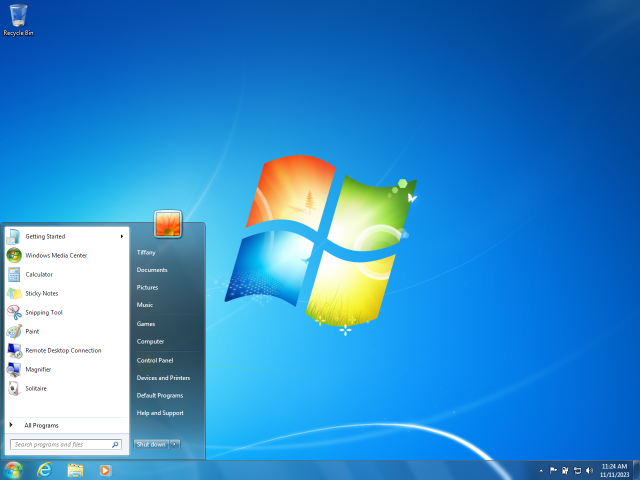
 Windows 7 was a popular Operating System released by Microsoft in 2009. It offered a refined user experience and improved stability compared to its predecessor, Windows Vista, becoming a widely adopted platform.
Features
Windows 7 introduced numerous enhancements and new functionalities while also refining existing ones compared to Windows Vista, focusing on user experience, performance, and addressing user feedback.
New and Improved Features
- Redesigned Taskbar (Superbar): The taskbar received a significant overhaul, featuring larger icons, the ability to pin applications directly, and Jump Lists for quick access to recent files and common tasks specific to each application.
- Aero Peek: Users could quickly preview their desktop by hovering over the far right end of the taskbar, making open windows transparent.
- Aero Snap: Windows could be easily resized and arranged by dragging them to the edges of the screen, allowing for quick side-by-side comparisons or maximizing.
- HomeGroup: This feature simplified File Sharing and Printer Sharing between computers on a Local Area Network, requiring only a simple password for setup.
- Libraries: Introduced as virtual folders, Libraries allowed users to consolidate content (Documents, Music, Pictures, Videos) from multiple physical locations on their computer and network into a single, unified view without moving the actual files.
- Device Stage: Provided a centralized, rich graphical interface for managing connected devices like printers, phones, and cameras, offering quick access to device-specific tasks and information.
- Action Center: Consolidated system notifications, security alerts, and maintenance messages into one accessible location, giving users a clear overview of their system's health.
- Improved User Account Control: UAC was made less intrusive with more granular control over notification levels, allowing users to adjust the frequency of security prompts.
- Performance Enhancements: Windows 7 boasted faster boot times, reduced memory footprint, and improved overall system responsiveness and power management compared to its predecessor.
- Multi-touch and Handwriting Support: Native support was integrated for touch-screen interfaces, allowing for multi-touch gestures, and improved handwriting recognition for tablet PCs.
- DirectX 11: Included the latest version of DirectX for enhanced graphics and gaming performance.
Removed Features
To streamline the Operating System and reduce bloat, some features present in Windows Vista were removed or re-positioned:
- Windows Meeting Space: Removed in favor of online meeting solutions and more modern collaboration tools.
- Windows Photo Gallery and Windows Movie Maker: These multimedia applications were separated from the OS and made available as part of Windows Live Essentials, allowing for independent updates.
- Some classic games like InkBall and Hold'em were also removed from the default installation.
Editions
Windows 7 was released in six main retail editions, each targeting different market segments and offering varying feature sets.
- Starter: Designed for netbooks and emerging markets, this edition had the most limited feature set, lacking Aero Glass, multi-monitor support, and certain customization options.
- Home Basic: Available in emerging markets, this edition offered more features than Starter but still lacked the full Aero Glass interface and some advanced networking capabilities.
- Home Premium: The primary edition for home users, it included the full Aero Glass experience, Windows Media Center, Multi-touch support, and improved media features.
- Professional: Targeted at small businesses and power users, this edition included all features of Home Premium, plus Domain Join, Group Policy, Remote Desktop host capabilities, and Encrypting File System.
- Enterprise: Available only to large organizations via Volume Licensing, it included all features of Professional, plus BitLocker drive encryption, DirectAccess, and Multilingual User Interface (MUI) packages.
- Ultimate: Combined all features of Home Premium and Enterprise, making it the most comprehensive edition for enthusiasts and users who wanted all available functionalities.
System Requirements
To run Windows 7, a computer typically needed to meet the following minimum specifications:
- CPU: 1 gigahertz (GHz) or faster 32-bit (x86) or 64-bit (x64) processor
- RAM: 1 gigabyte (GB) for 32-bit or 2 GB for 64-bit
- Storage: 16 GB available disk space for 32-bit or 20 GB for 64-bit
- Graphics Card: DirectX 9 graphics device with WDDM 1.0 or higher driver
Memory Limits
While the minimum RAM was modest, Windows 7 editions had limits on supported physical memory:
- 32-bit Editions: Generally supported a maximum of 4 GB of RAM.
- 64-bit Editions: Supported significantly higher amounts, ranging from 8 GB for Starter edition up to 192 GB for Professional, Enterprise, and Ultimate editions.
Processor Limits
Different editions of Windows 7 also had limits on the number of physical CPU sockets and logical processors they could utilize:
- 32-bit Editions: Limited to a single physical CPU socket.
- 64-bit Editions:
Development
Development for Windows 7 began before the release of Windows Vista, initially under the codenames "Blackcomb" and "Vienna."
Blackcomb was the ambitious successor to Windows XP, initially planned for release in 2000s, featuring advanced data storage systems (WinFS), a new user interface, and fundamental architectural changes. However, its ambitious scope led to significant delays. Microsoft eventually scaled back Blackcomb, leading to the creation of an interim release, codenamed Longhorn (which eventually became Windows Vista).
After Longhorn's troubled development and subsequent simplification, Microsoft refocused its efforts. The codename Vienna then emerged, picking up many of the features originally envisioned for Blackcomb but re-evaluated for practicality and performance. Vienna aimed to address the criticisms of Windows Vista by focusing on improving Performance, Reliability, and user experience, rather than introducing revolutionary new features. The goal was an incremental, high-quality release.
Ultimately, Vienna was officially named Windows 7. Its development focused on refining the Windows Aero interface, improving the taskbar (Superbar), enhancing multimedia capabilities, and making the Operating System more efficient and user-friendly. The development process emphasized user feedback and a modular approach, allowing for faster development and more stable releases.
Updates
Throughout its lifecycle, Windows 7 received several important updates to enhance its functionality, security, and performance. The most significant of these was Service Pack 1 (SP1), released in February 2011, which bundled previously released security updates, hotfixes, and minor improvements. A Platform Update was later released, bringing improvements to DirectX, graphics, and display technologies. In 2016, Microsoft also released a Convenience Rollup for Windows 7 SP1, which consolidated many post-SP1 updates into a single package to simplify installation. From October 2016, Microsoft transitioned to a Monthly Rollup model, combining all non-security and security updates into a single cumulative update. Mainstream support for Windows 7 ended in January 2015, and extended support officially concluded on January 14, 2020.
Reception
Windows 7 was largely met with critical acclaim and strong user adoption, especially when compared to its predecessor, Windows Vista. Reviewers praised its improved Performance, enhanced user interface, greater stability, and faster boot times. It was seen as a significant refinement of the Windows experience, addressing many of Vista's shortcomings. Its ease of use and compatibility with a wide range of hardware and software contributed to its widespread popularity, quickly making it one of the most successful versions of Windows.
